Extend vs Unify: Microsoft Teams Contact Center Integration Without Choosing Sides
Microsoft Teams contact center integrations follow one of three models: Connect, Extend, or Unify. Extend builds the contact center into the Teams client. Unify runs Teams Phone calls in other applications, such as customer relationship management (CRM) software. You don't have to pick one: on a platform certified for both, each team works in the model that suits it.
Since Microsoft made Teams Phone extensibility generally available in September 2025, Unify has become a production-ready third option next to Connect and Extend. For IT leaders, that raises a practical question: which model fits which team?
Luware Nimbus, Luware's Microsoft Teams-native contact center platform, is certified by Microsoft for both Extend and Unify. As of September 2026, Luware is among ten organizations worldwide holding Microsoft's Unify certification. This article explains how the three models work and where Extend and Unify each fit best. It also shows how one platform can run both, so no team is forced into the wrong model.
What are the three Microsoft Teams contact center integration models?
Microsoft certifies vendors for three contact center integration models, which differ in how deeply they tie into Teams Phone. Connect links an outside platform through Direct Routing, Extend works inside the Teams client, and Unify runs on Azure Communication Services (ACS).
Connect routes each call through the vendor's platform first. The call enters through a certified session border controller (SBC), and the contact center then hands it to an agent in Teams. That makes Connect a fast way to attach an existing contact center, and it can bridge Teams with other platforms such as Cisco.
The trade-off is distance from Microsoft's infrastructure. Calls cross several systems, which risks latency and lower call quality. Security, encryption, and hosting location become the vendor's responsibility and need their own compliance review, and inside Teams the interaction stays voice-only.
Extend keeps the call in Microsoft Teams. The contact center doesn't take over the call; it tells Teams where to route it through the Microsoft Graph Cloud Communications API. Agents work in the Teams client they already know, with every Teams modality from voice to video and screen sharing. Because the call and its media stay in the customer's Teams tenant, encryption and data handling follow Microsoft 365 policies the organization has already approved.
Unify runs the contact center on Teams Phone telephony, but outside the Teams client. It builds on Teams Phone extensibility, which lets Contact Center as a Service (CCaaS) applications use Teams Phone numbers and calling. Vendors connect to it through ACS Call Automation and the ACS Calling SDK. Agents can take calls in a CRM, a browser-based agent desktop, or Teams itself, while AI services work directly on the live call.
Unlike Connect, where calls reach the vendor's platform first, Extend and Unify both run calls on Microsoft's Teams Phone infrastructure. Microsoft certifies vendors separately for each model, so one vendor can hold one, two, or all three certifications.
The three integration approaches: Connect, Extend, and Unify
Microsoft provides three contact center integration options for Independent Software Vendors (ISVs): Connect, Extend, and Unify. These offer varying depths of integration.
- Connect offers a basic integration between the Teams Phone system and the contact center solution through SIP connectivity.
- Extend enables deeper integration directly into the Teams client via the Cloud Communication API.
- Unify enables ISVs to develop native Azure Communication Service-based CCaaS applications using the Teams calling infrastructure.
| Criterion | Connect | Extend | Unify |
| Integration technology | Certified SBCs, Direct Routing, presence API | Routing, presence APIMicrosoft Graph Cloud Communications API | Teams Phone extensibility with ACS Call Automation and Calling SDK |
| Where agents work | Standalone client or third-party app in Teams | Microsoft Teams client | Client of choice: CRM, agent desktop, browser, or Teams |
| Public switched telephone network (PSTN) connectivity | Direct Routing | Direct Routing, Operator Connect, Calling Plans | Direct Routing, Operator Connect, Calling Plans |
| Call path | Vendor platform first, then Teams | Stays in Teams; the contact center directs routing | Runs on Teams Phone; ACS carries the media |
How did Microsoft's contact center integration models evolve?
Each model reflects the Microsoft technology available when it appeared: Connect relied on Direct Routing, generally available in Teams since 2018. Extend grew from the Graph Cloud Communications API, previewed the same year, and Unify from Teams Phone extensibility in 2025.
- 2017: Microsoft Teams launches as a new unified communications hub, without a native contact center framework.
- 2018: Direct Routing reaches general availability in June, letting organizations connect their existing phone carrier to Teams via certified SBCs. That becomes the basis for Connect. In September, Microsoft previews the Graph APIs for calls and online meetings, which let applications control Teams calls. Extend builds on them.
- 2021: ACS reaches general availability in March, offering programmable voice, video, and chat on the same communication platform that runs Teams.
- 2022–2023: ACS Call Automation enters public preview in November 2022 and reaches general availability in July 2023, adding server-side control and custom call flows.
- 2025: Microsoft announces Teams Phone extensibility in March and releases it in September, creating the foundation for Unify.
The practical implication: Extend has years of production use behind it, while Unify is newer and its ecosystem is still maturing.
Luware's first Teams offering, Stratus, used the Connect approach while the company built for Extend. Luware Nimbus launched in February 2021, and in May 2022 Tom Arbuthnot of Tom Talks reported it as the second solution certified for Extend.
Extend vs. Unify: what are the benefits and drawbacks?
Extend is the proven, predictable choice for agents who work in Microsoft Teams all day. Unify suits teams that need a CRM-based or dedicated workspace and AI on the live call, in exchange for usage-based costs and a younger ecosystem.
| Agent workspace | Extend | Unify |
| Agent workspace | The Teams client employees already know, so rollout is fast and training minimal | Client of choice: Teams, a CRM such as Salesforce, or a dedicated agent desktop; agents new to a dedicated client need some onboarding |
| Focus | One interface for every role; in high-volume work, customer calls compete with chats and meeting invites | Dual persona separates contact center calls from personal Teams communication, so agents see at a glance who is waiting |
| AI on live calls | Available, with a small delay because AI reaches the media through the Graph API | Direct access to the media stream in ACS, so transcription, summaries, and AI voice agents run during the call with low latency |
| Cost model | Predictable, license-based costs | Licensing plus usage-based ACS consumption that varies by feature; live AI consumes more |
| Maturity | Proven technology, in production use for years | Newest model; certifications, ecosystem, and best practices still maturing |
Cost deserves a closer look before any team moves. Microsoft bills Unify vendors for ACS usage on each call leg, and live transcription adds Azure Speech charges. In practice, consumption rises with live AI use, so Unify pays off where that AI saves agents the most time.
Can Extend and Unify run on the same contact center platform?
Yes: a platform certified for both models can run Extend and Unify side by side. Each team then works in the model and client that suit it, while IT manages one environment.
Luware NimbusOne, Luware's unified agent desktop built on Teams Phone extensibility, brings the Unify model to Luware Nimbus. Both models share its routing, workflows, and administration, managed from one admin center.
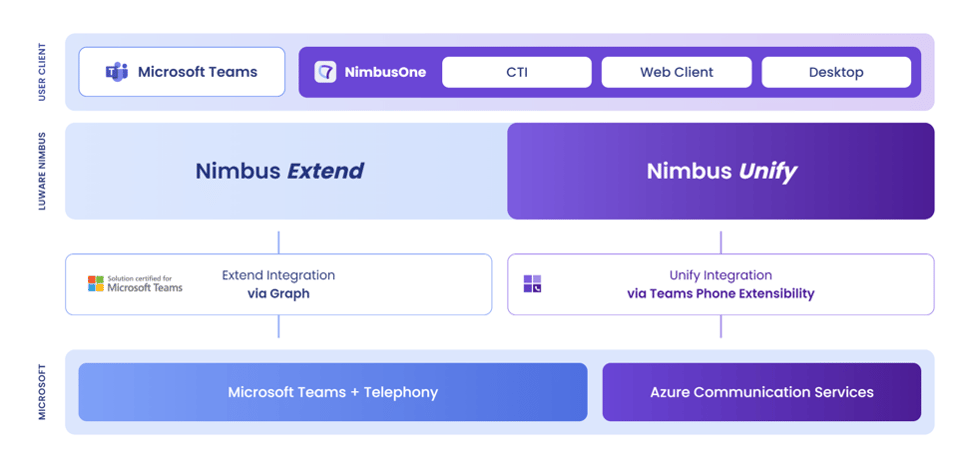 Luware Nimbus runs both models on one platform: Extend for agents in Microsoft Teams, Unify for agents in NimbusOne.
Phone-centric users stay in Microsoft Teams with Extend. Groups with specialized requirements, such as CRM-first sales teams or a high-volume service line, work in NimbusOne instead. They take calls inside their CRM or a dedicated agent desktop, on existing Teams Phone numbers.
Which model fits which team?
Match the model to how a team works: groups that live in Teams fit Extend, while CRM-first, high-volume, or AI-heavy groups fit Unify.
| Team profile | Best fit | Why |
| Reception, internal help desks, and informal agents with occasional calls | Extend | Calls arrive in the Teams client they use all day, with no extra tool to learn |
| Telephony-first service teams that collaborate heavily in Teams | Extend | Proven technology and predictable, license-based costs |
| CRM-first sales or service teams | Unify | Calls, customer records, and context come together in the CRM they already use |
| High-volume support or citizen service lines | Unify | A focused agent desktop, with dual persona keeping customer calls apart from chats and meetings |
| Groups that want AI on every live call | Unify | Direct media access supports live transcription, summaries, and AI voice agents |
Michael Jakob, Luware's co-founder and Chief Technical Officer, describes the goal behind NimbusOne as “one platform, one administration layer, and one consistent customer service experience.”
Match each team to the model that fits
Extend and Unify aren't competing answers to one question. Extend gives agents who live in Teams a proven, predictable setup, while Unify offers specialist teams their own workspace and AI on the live call. On a platform certified for both, the decision happens team by team.