Your Contact Center Knowledge Management Is Broken
Not because you lack data, but because you're not capturing it.
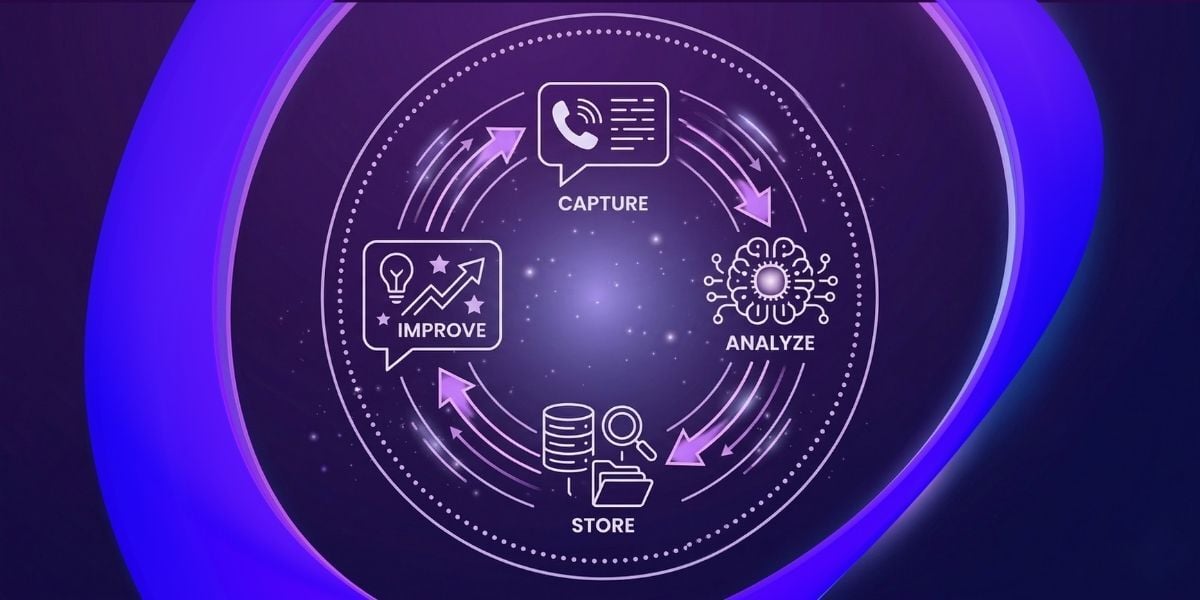
Contact center knowledge management is the practice of capturing, organizing, and continuously updating the information agents need to resolve customer issues accurately and quickly. In AI-ready operations, it goes further: it turns every conversation into structured data that feeds back into the systems making the next interaction smarter.
Most contact centers have a knowledge base. Fewer have a knowledge system, one that learns from every call, stores what it learns, and feeds that intelligence back to agents and AI workflows automatically. The gap between the two is where most AI initiatives stall. This article explains the four-step AI feedback loop that closes that gap, what to look for in a platform that can run it, and why the data you need is already being generated every time a call comes in.
What is contact center knowledge management?
Contact center knowledge management is defined as the systems and processes an organization uses to capture, organize, and deliver accurate information to agents and customers at the moment it is needed. That definition describes the 2015 version of the problem.
In an AI-era contact center, the knowledge base is not just a filing cabinet agents search between calls. It is the data foundation that determines how well your AI performs, how quickly automation cases can be deployed, and whether the intelligence your team generates today is still available to the team member who joins next quarter.
The practical difference between traditional and AI-ready knowledge management matters for every manager evaluating platforms right now:
| Dimension | Traditional knowledge management | AI-ready knowledge management |
| Content Source | Authored manually by knowledge managers | Generated automatically from conversations |
| Update cycle | Periodic review and manual edits | Continuous, after every call |
| Primary User | Agent searching during or after a calt | Service Agent (real-time), AI copilot, automation layer |
| Integration | Standalone repository | Connected to CRM, CCaaS platform, AI workflows |
The consequence is that a knowledge base built on traditional assumptions will bottleneck every AI initiative that depends on it.
Why contact centers are sitting on untapped intelligence
Every contact center is already generating the intelligence it needs to improve AI performance. The problem is not a lack of data: it is the absence of a system to capture, structure, and retain what each conversation produces.
Consider what happens during a typical call. A customer describes a problem. An experienced agent works through a solution, drawing on institutional knowledge that took months to build. The customer's issue is resolved. The call ends. And almost none of what was produced in that exchange, the specific question, the specific resolution path, the edge case the agent handled smoothly, is retained anywhere.
James Cadman, Chief Customer Officer at Luware, describes the scale of that loss directly:
The consequence is threefold. Contact Center Agents reinvent answers to questions that were already resolved last week by a colleague. AI copilots produce unreliable suggestions because they have no grounded source to draw from. And automation cases stay in planning because the data foundation is not there to validate them.
What goes missing when conversation intelligence is not captured:
- The resolution path an experienced agent used for an unusual case
- The exact answer to a question your AI will almost certainly encounter again
- The pattern that signals an emerging product or service issue before it becomes a volume problem
How the AI feedback loop works: from conversation to knowledge base
The feedback loop runs in four steps, each one buildable independently, and the first step unlocks everything that follows.
-
Enable transcription. Every call is captured automatically as a text record. This single step is the prerequisite for all that comes after, and it costs far less than the value it makes recoverable.
-
AI summarization. Rather than agents writing up call notes manually, an AI model processes the transcript and extracts the key information: what was the problem, what was the solution, what follow-up is required. After-call work drops. Accuracy improves. Critically, the output is structured, not a block of free text, but a problem-and-solution statement that can be stored, searched, and retrieved.
-
Push to your knowledge store. That structured summary is written automatically to SharePoint, your CRM, or your preferred knowledge system. Via Power Automate or through native platform integrations, this step takes minutes to configure. There is no migration project and no new system to build.
-
Feed the AI. The growing library of real conversations becomes the source your AI pulls from when it encounters new questions.
As Cadman explains:
In practice, the loop means the contact center gets measurably smarter with every interaction, without adding to agent workload.
Luware Nimbus, Luware's contact center platform built natively on Microsoft Teams, delivers all four steps as a connected system rather than four separate tools. Three components run the loop:
- External Web Requests connect the platform to external systems, pulling customer context into the call and pushing conversation data out to your knowledge store after it ends.
- Luware Nimbus Companion surfaces real-time knowledge and guidance to agents during the call, putting the right information in front of the right person at the right moment.
- Virtual User handles automated interactions at the front of the call, powered by the knowledge base the feedback loop continuously builds.
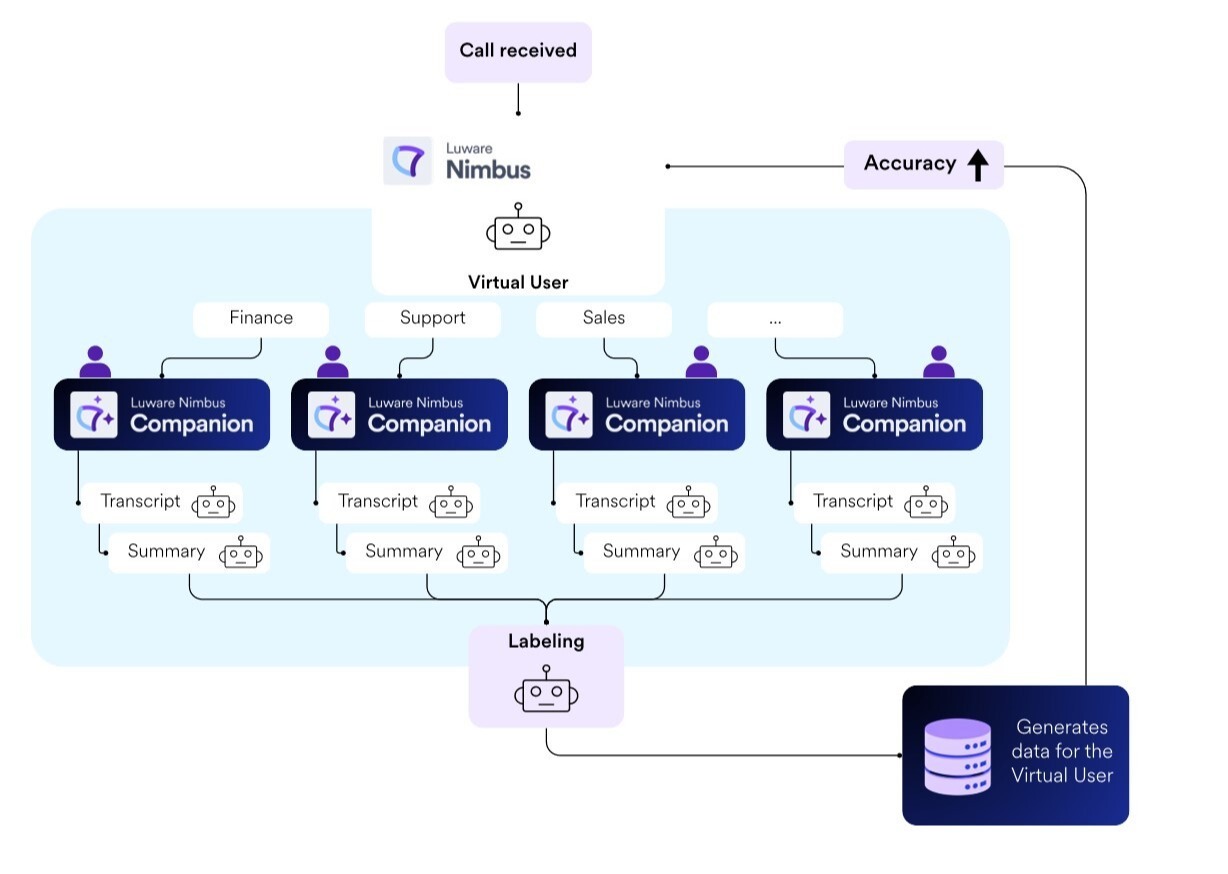 This is how the AI feedback loop works in Luware Nimbus: every call passes through Virtual User and Companion, generates structured data — and makes the system a little more precise with every conversation.
The results are measurable. One of our customers, a major insurance provider that replaced its legacy IVR with Virtual User improved first contact resolution (FCR) from 74% to 96%, a 22-point gain driven by the quality of knowledge the system had access to.
What to look for in a contact center knowledge management system
What matters most in a contact center knowledge management system is not the size of its feature list. It is whether the system generates new knowledge automatically, integrates with the tools your agents already use, and feeds that knowledge back into AI workflows without requiring manual intervention at each step.
For contact center managers and IT architects evaluating platforms, five criteria separate a genuine AI-ready knowledge management system from a repositioned document library:
| Criterion |
What to ask the vendor |
Red flag if missing |
| Native platform integration | Is KM built into the contact center platform, or a third-party add-on? | Requires a separate login, contract, or middleware to connect |
|
Automatic transcription & summarization |
Is transcription built in, or does it require additional tooling? | Transcription requires a separate AI vendor |
|
Bidirectional data flow |
Can the system pull customer context in before the call and push conversation data out after? | Data only flows one direction, or only on request |
|
Compatibility with existing knowledge stores |
Does it write to SharePoint, your CRM, or Zendesk without a migration? | Requires moving all existing knowledge into a proprietary system |
|
Path to agentic AI |
Can the same platform graduate from agent assistance to automated interaction handling as the knowledge base matures? | Agent assistance and automation run on separate products with no shared data layer |
A platform that checks three of five will still create the silos and manual handoffs that fragment the feedback loop. The goal is a system where all five work together.
Luware Nimbus addresses all five criteria within a single platform, with CRM integration and Microsoft ecosystem compatibility built in rather than bolted on.
Luware Nimbus: the contact center that learns
Contact center knowledge management has moved past the question of whether to have a knowledge base. The question now is whether your knowledge base is static or self-improving: whether it waits to be updated or whether it grows automatically from every conversation your team handles.
The contact center that has the feedback loop running is already building the data foundation for agentic AI. Each call adds a resolved case to the knowledge library. Each resolved case makes the next automated interaction more accurate. The infrastructure investment is lower than most teams expect, and the starting point is a capability most platforms already offer: transcription.
See how Luware Nimbus connects knowledge management, agent support, and AI automation in a single platform: explore Luware Nimbus.

More from our Blog

Microsoft Teams Contact Center Integrations: Connect – Extend – Unify
Compare Extend vs Unify for Microsoft Teams contact center integration: costs, licensing, AI, and how to run both models on one platform. Read the guide.